Understand your events
How to inspect event properties, request details, and raw parameters
Understand what each detail tab contains and what a request status actually proves.
Select an entry in the timeline to open its inspector. On a wide screen, details sit beside the event list. In a narrow view, choose Events to return to the list. Viewed entries carry a small indicator, and the last viewed entry is highlighted so you can find your place.
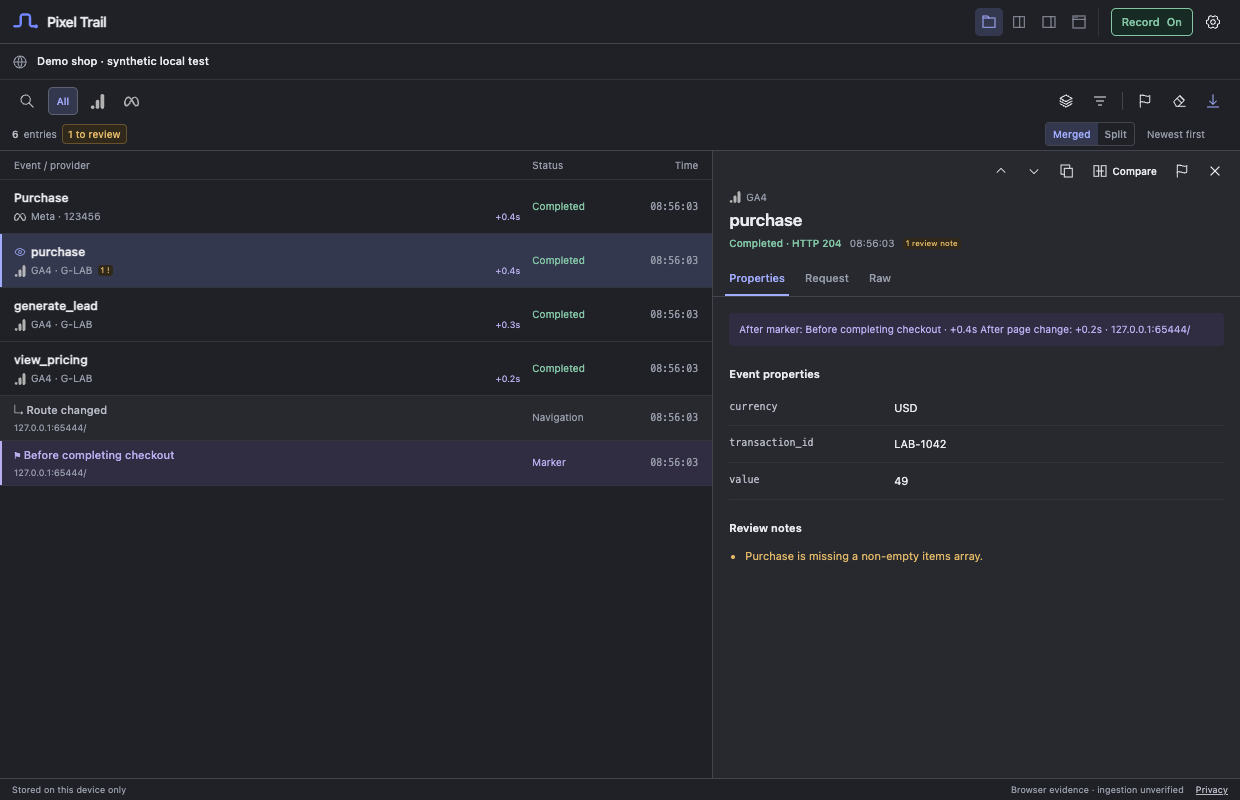 Actual extension interface with synthetic test data.
Choose the right detail tab
Properties shows supported decoded event properties, ecommerce items, elapsed time after a marker or page change, and any review notes. Pinned parameters appear first when that exact key exists in the decoded properties.
Request shows available transport context: status, tag or pixel ID, observation time, page, destination URL, and source. Some entries also identify an iframe. Page/API observations are separate from outgoing network requests.
Raw shows captured parameters after redaction and size limits. It is not an unmodified packet capture, a response-body viewer, or a saved copy of binary request bytes.
Interpret the status
| Status | What Pixel Trail observed |
|---|---|
| Detected | A supported tag or script was found. |
| Intent observed | A supported page/API call or data-layer message was observed. |
| Consent observed | A technical consent command was observed. |
| Sent | A supported outgoing request was observed; its final result may still be pending. |
| Completed | The browser reported that the request completed. |
| HTTP error | The browser returned HTTP 400 or higher. |
| Failed | The browser reported a request failure. |
For Failed entries, Properties shows the browser’s error text when supplied. Pixel Trail cannot always tell whether a blocker, connection problem, or another browser condition caused it.
Completed does not mean ingested. These entries cannot establish platform processing, attribution, server-side delivery, or conversion deduplication. Use the destination platform to confirm those outcomes.
If details are incomplete, open Capture notes. Unsupported or unavailable payloads remain request evidence rather than invented individual events.
Still need help? Contact support.