Test your tracking
How to clear the event list without deleting saved history
Choose a fresh screen, restore hidden events, or permanently delete history across tabs.
Pixel Trail separates an empty working view from deleting your evidence.
Start with a fresh screen
Click Clear view in the event toolbar. Pixel Trail hides the entries that were already saved and resets the event filters. New activity can appear immediately if recording is on.
A Fresh view notice shows when the view was cleared and how many earlier entries remain in history. Nothing was deleted, and recording was not stopped. The hidden boundary belongs to that viewer’s local view state; it is not a global erase across every open inspector.
Choose Show history in the notice to restore earlier entries. You can also use Settings → History & tools → Show history. Entries still need to be within the retained local history to be restored.
Delete the evidence you no longer need
Open Settings → History & tools → Delete all history…. Read the confirmation and choose Delete all history to proceed.
This permanently removes saved events, page boundaries, markers, and test runs from every tab in this browser profile, including activity hidden by filters or Clear view. It cannot be undone.
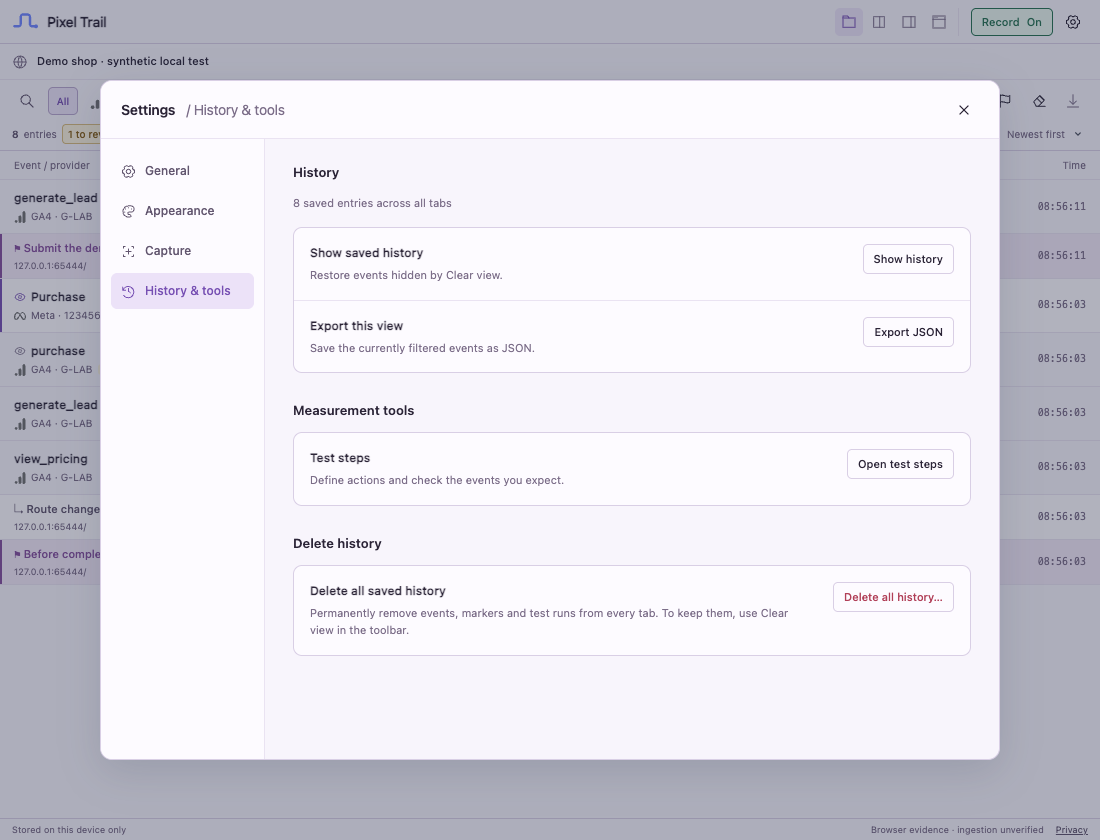 Actual extension interface with synthetic test data.
Your settings and recording state remain unchanged. If Record is On, incoming requests can refill the timeline immediately after deletion. Turn recording off first if you want the list to remain empty.
Which action should I use?
| What you want | Use |
|---|---|
| A quiet screen before the next action | Clear view |
| A named reference point in the existing history | Mark here |
| Earlier activity hidden by Clear view | Show history |
| Permanent removal of saved evidence and test runs | Delete all history… |
Clearing or deleting in Chrome does not clear Safari’s history, another Chrome profile, or files you already exported.
Still need help? Contact support.