Test your tracking
How to compare events and properties from multiple analytics providers
Switch between split and merged timelines, then choose two events to compare their captured properties.
Select two or more providers using their logos or the Providers checklist. When at least two provider lanes are available, the timeline offers Merged and Split.
- Merged puts the selected providers in one ordered stream.
- Split gives each provider its own lane, with page changes and markers spanning the timeline.
Use a marker before the action you are testing, then perform that action once. This gives you a shared reference point when providers send different event names or send their requests at different times.
Compare two specific events
- Open the first event.
- Choose Compare — its accessible label is Compare with another event.
- Select the second event from the timeline.
- Read the two events side by side under Properties, Request, or Raw.
- Enable Differences only to reduce the comparison to fields that are not equal, including missing and redacted fields.
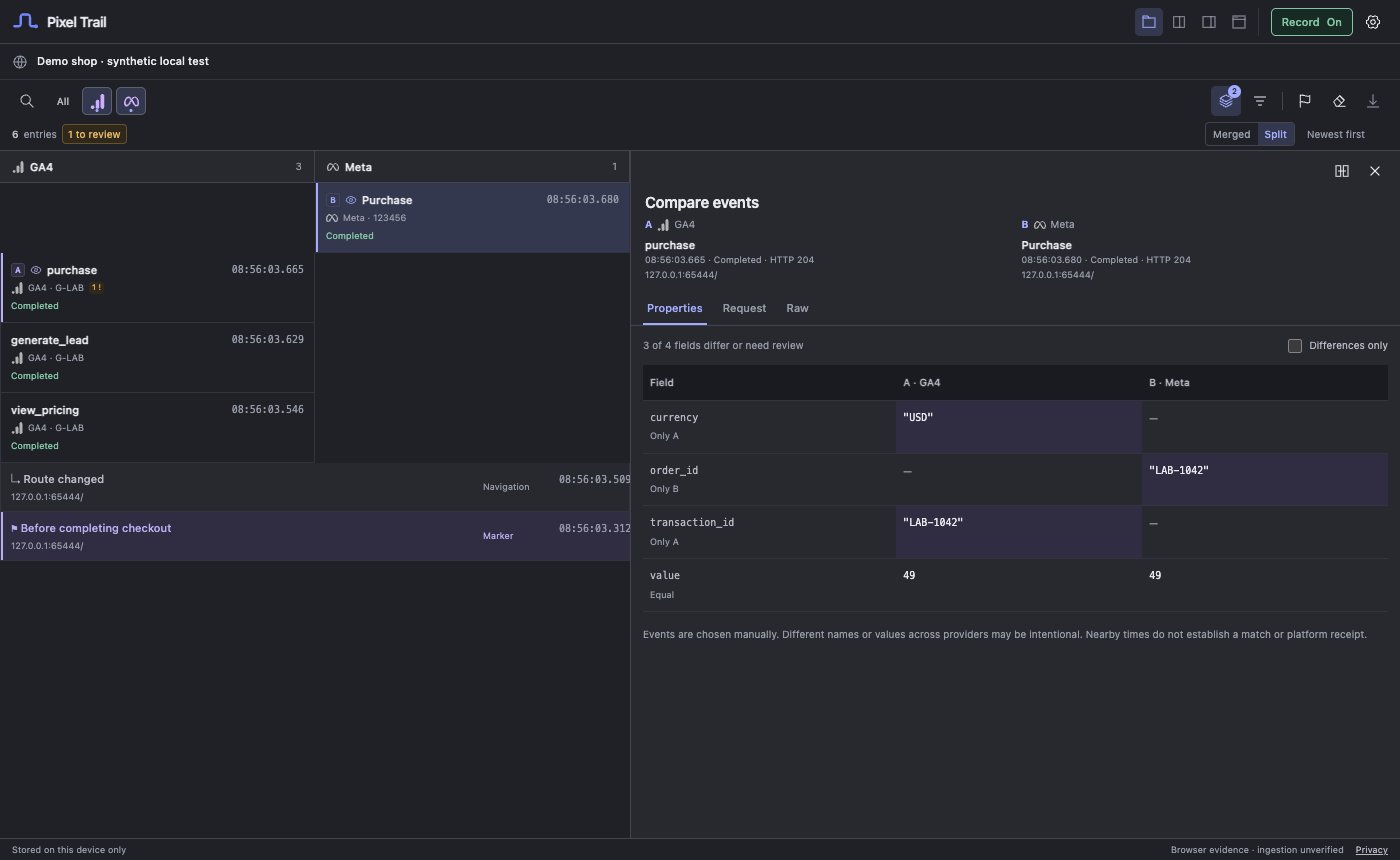 Actual extension interface with synthetic test data.
The comparison distinguishes matching values, different values, values present on only one side, and redacted values. Value types matter: the number 1 and the string "1" are different captured values. Redacted fields cannot establish equality.
Use Swap compared events to reverse the sides or End comparison to return to one event.
Decide what should match
You choose the pair. Pixel Trail does not automatically match two events because their timestamps or names are close. It also does not translate one provider’s event taxonomy into another’s.
For a purchase check, you might compare currency, value, transaction ID, and item details. Different schemas can represent the same business action with different property paths. The comparison surfaces captured differences; it does not decide whether your tracking plan is correct or whether either platform ingested the conversion.
Large nested payloads are bounded in the comparison. Check any omission notice before treating the visible rows as the whole payload.
Still need help? Contact support.